CamPermanent Manual
Permanent Recording Settings
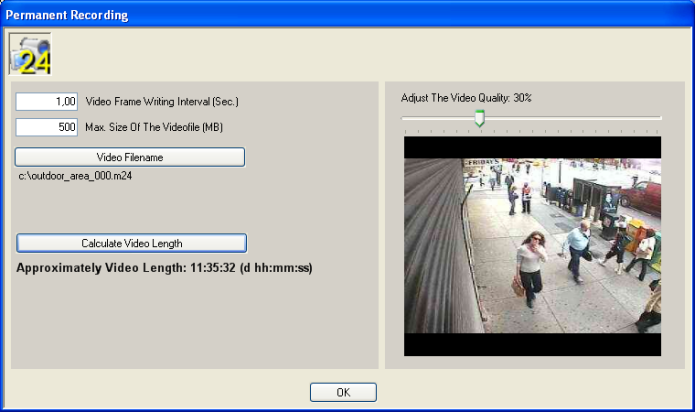
Here are all settings made which influences the permanent
video file. The video quality determines the size of each written frame
and the frame writing interval determines how often the program writes
a frame into the video file. Adjust these settings carefully to get a good
balance between video quality and CPU usage!
Video
Frame Writing Interval (Sec.) - select
how often a video frame is written into the video. The lowest value
is 0.1 ( 10 frames are written in 1 second ). Higher values decreases
the CPU usage a lot.
Max. Size Of The Videofile (MB) -
select the maximum videofile size. If this value is reached,
the videofile size doesn't increase further. The next coming
frames are written into the videofile from the beginning. So
the video contains always the last minutes or hours depending
on the video length.
Video Filename - select the name of the videofile.
The extension is always m24.
Calculate Video Length - press this button to calculate
the approximately videofile length. The length depends
on the max. filesize, the writing interval and the video
quality. It's only approximately, because the single frame
size depends on the current frame content.
Adjust The Video Quality - adjust the quality between
1 - 100%
|